
How Faber works
Faber takes a list of commands, runs them in a sandbox it builds for that one request, and answers with what each command printed and how it ended. This page follows a request through Faber in plain terms. Each section ends with links to the pages of the Under the hood section, which have the details.
A request, start to finish
Section titled “A request, start to finish”Holds the API key. End users talk to it, never to Faber.
Checks the key and the request’s size, and reserves room for it.
Compilers, tests, scripts, run one step after another.
- Faber and the kernel (trusted)
- Submitted code (untrusted)
- Outside Faber
- Starts or calls
- Carries data
- Your service sends the steps. A request is JSON: a list of steps, each a command with its arguments, input and files. Faber checks the API key and refuses requests over its configured limits before anything runs.
- Faber reserves room for it. Each instance runs a fixed number of tasks at
once, and when there is no room it answers
503straight away, with aRetry-Afterheader saying when to try again. It never queues work. - Faber builds a sandbox for this request: an empty working directory called
the workspace (
/faber), the compilers and interpreters installed in its image (readable, not writable), and no network. - The steps run in order. A step is one command, or several that run at the same time (a parallel step). Every step sees the files the earlier ones left in the workspace.
- Faber answers with one result per command: its output, exit code, how much
memory and CPU it used, and an
outcomethat says how it ended. The sandbox and everything in it is deleted first.
- Submitted code (untrusted)
The request lifecycle follows the same request through every process and check, and the architecture page shows which process does what.
What is kept apart
Section titled “What is kept apart”Faber uses features of the Linux kernel (the core of the operating system, which every program on the machine shares) to give each sandbox a private view of the machine:
- A task sees the workspace, a scratch
/tmpand the image’s toolchains, which it can read but not change. Faber’s files, the host’s files and other requests’ workspaces are not there. - It has no network connection at all.
- It sees only the processes it started itself. It cannot see or signal Faber, other tasks, or anything else on the machine.
- It has no administrator rights, inside the sandbox or outside. On the host, each running request has a user ID of its own, so two requests cannot touch each other’s processes.
- What it may ask of the kernel is filtered. Programs work by making system calls, requests to the kernel such as “open this file” or “start a process”. A call that could reach beyond the sandbox (loading a kernel module, mounting a filesystem, reading another process’s memory) kills the program that made it.
Sees only its own processes. No administrator rights, a filtered set of system calls, and its own memory, process and CPU budget.
A parallel task: same workspace, separate processes and budget.
- Faber and the kernel (trusted)
- Submitted code (untrusted)
- Outside Faber
One thing is shared by everything: the kernel. A bug in the Linux kernel that a task can reach is a way out, and the Faber container holds the rights to build sandboxes, so getting out of a sandbox means getting into the host. Give Faber a machine of its own, and a virtual machine per trust domain for anonymous public code. The isolation tier explains where that line is.
Isolation layers lists each mechanism with what it stops and what it does not, and the filesystem a task sees maps every path.
What the limits do
Section titled “What the limits do”Each task runs with a budget. The operator sets the numbers; a request cannot raise them.
| Limit | Default | When a task reaches it |
|---|---|---|
| Memory | 256 MiB | It is killed: out_of_memory |
| Processes and threads | 64 | It cannot start more: pids_limit |
| CPU speed | half a core | It is slowed down, not stopped |
| CPU time | 5 s | It is killed by a signal: signaled |
| Running time | 5 s | It and everything it started are killed: timed_out |
| Output | 1 MiB per stream | It is killed, and the output cut: output_limit |
| Whole request | 30 s | Steps that cannot start in time: not_started |
A task that hits a limit is a normal result. The HTTP status is still 200,
and the task’s outcome says what happened, so a judge can turn it straight
into a verdict.
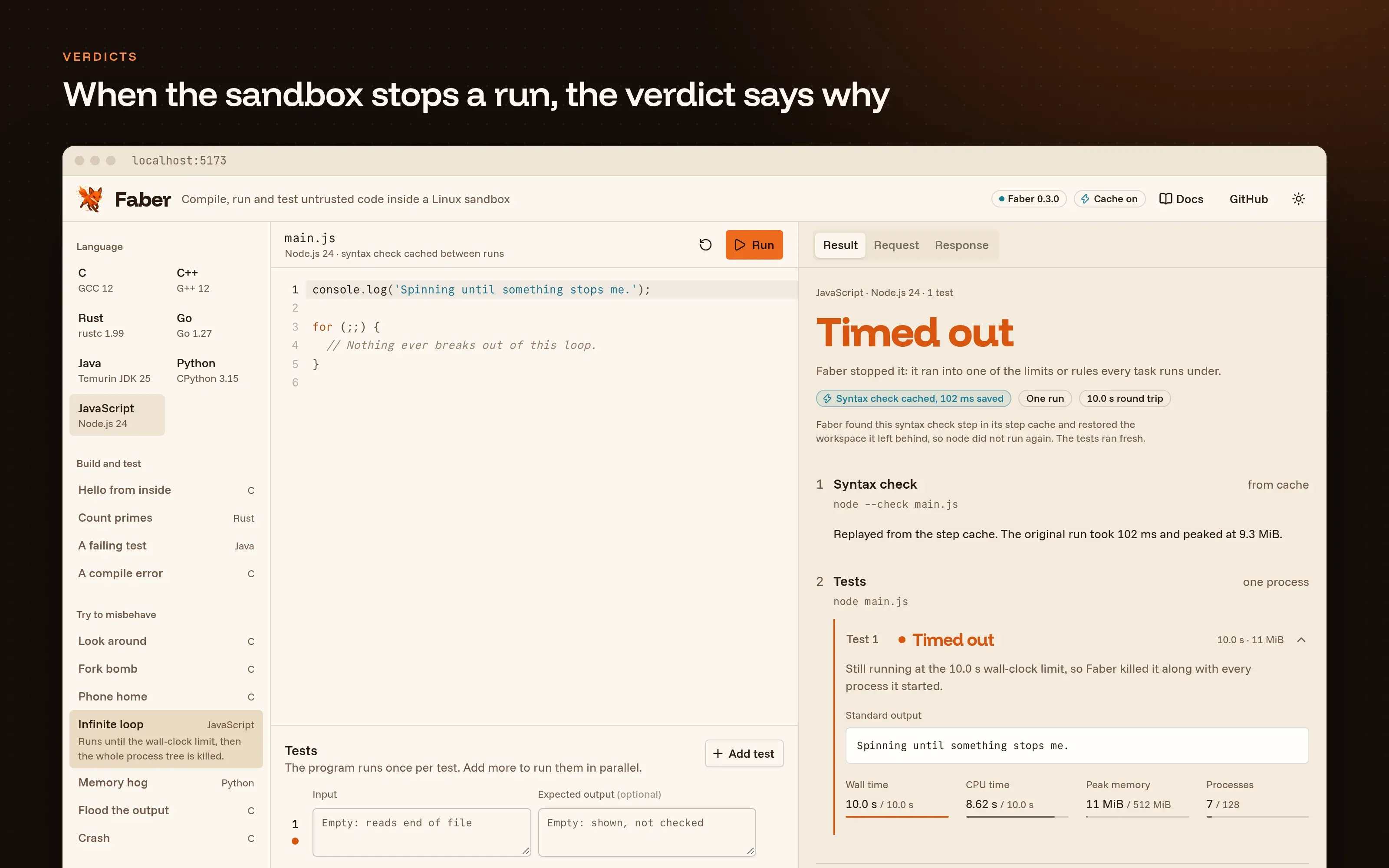
demo/ directory turns each outcome into a verdict. Here an endless loop has reached the wall-clock limit its operator configured.Cgroups and resource accounting shows how the kernel enforces each budget, and outcomes and failure handling how Faber decides which outcome to report.
How the cache saves work
Section titled “How the cache saves work”Judges compile the same submission again and again: once per batch of tests,
once per retry. With the step cache on, Faber can skip a step it has already
run. You mark the steps that always give the same result for the same input
(typically the compile step) with "cache": true.
- Faber and the kernel (trusted)
- Submitted code (untrusted)
- Starts or calls
- Carries data
An entry is found only when everything about the step is the same (command, arguments, input files), every step before it is the same, and the server runs with the same configuration and image. A failed compile is never stored, so a fixed submission is always compiled again. Several Faber instances can share one cache through Redis.
Step cache internals covers how entries are named, stored, checked and shared between machines.
Where the SDKs fit
Section titled “Where the SDKs fit”You can call Faber with any HTTP client: the API is JSON, and its OpenAPI
document describes every operation. The SDKs for
TypeScript, Rust, Go,
Python and PHP save the boilerplate: they build
requests step by step, retry 503 and 429 answers after the server’s
Retry-After, and give you typed results that tell a command that ran apart
from one that never started.
Keep the SDK on your servers. The API key lets its holder run code and read every uploaded file, so it does not belong in a browser.
One machine or many
Section titled “One machine or many”One Faber container serves a fixed number of tasks at once (10 by default)
and turns the rest away with 503. To serve more, run several instances
behind a load balancer, each on its own machine, and point them at one Redis
so that a step cached by one is replayed by all.
Scaling and deployment topology shows what is
shared between instances and what is not.
- Quick start: run Faber and send a request.
- Architecture and process model: the first page under the hood.